GemWrite
A word processor for OpenDocument files, with comments, spelling, and a command-line twin for scripts.
gemwrite
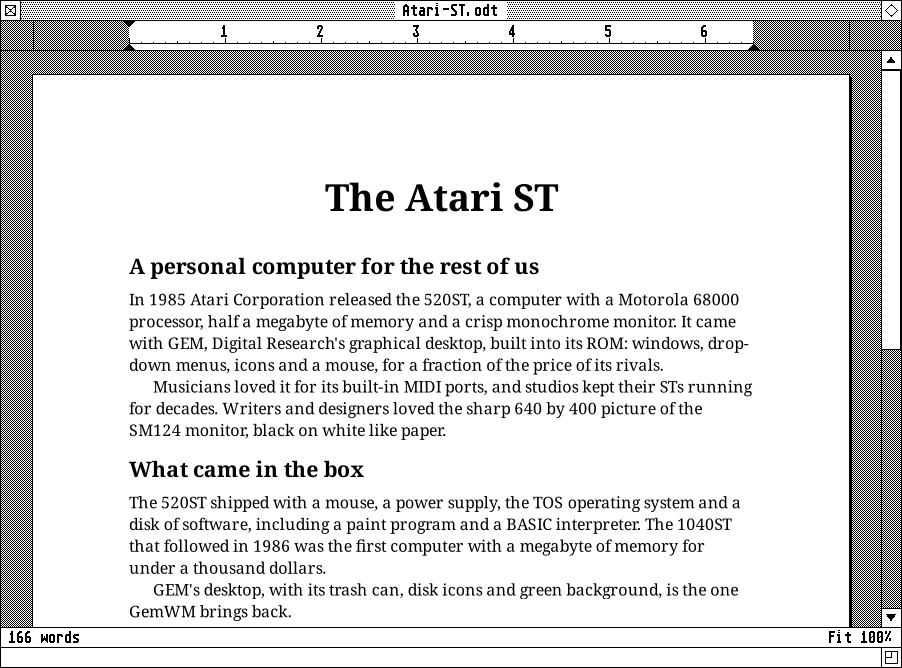
GemWrite is a word processor (Desk > Office). Pages show as they’ll print,
in the document’s own fonts, on GEM’s grey; everything around them is GEM: the
menus in the bar, a ruler, GEM’s scroll bars, and an info line with the word
count and the zoom. Documents are OpenDocument Text (.odt, as LibreOffice
and Word read) or plain .txt.
Its menus
- File: New, Open…, Save, Save As…, Revert to Saved, Export as Markdown… or PDF…, Print…
- Edit: Undo, Redo, the clipboard, Find… (^F) and Replace… (^H) in a box that stays up while you work, Find Next (^G), and Add Comment (^Alt+M).
- Style: Bold, Italic, Underline, Font…, Larger and Smaller, and the paragraph styles: Body Text, Title, Heading 1-3, Quote and Note.
- Format: alignment, line spacing, indents, tab stops, and bulleted and numbered lists.
- View: the ruler, the comments, and zoom.
On the ruler, drag the markers for the indents, click the scale to add a tab stop, and drag one off to remove it.
Comments
Select some text and a Comment button appears beside it; the comments are cards at the right, with Reply and Delete. They’re OpenDocument annotations, so LibreOffice and Word show them too.
Spelling
Spelling is checked as you type; right-click a word for corrections. Any
hunspell dictionary works (pacman -S hunspell-en_us), and the language
follows your locale unless ~/.config/gemwrite/settings.ini says otherwise:
[general]
author = Jane Doe
spell-language = en_GB
Options has Autosave, and Sync with File: another program writing the file shows “Changed on disk”, and with Sync on it’s read again by itself whenever nothing’s unsaved.
gemwrite-cli
gemwrite-cli edits documents without a display, with the same commands. It’s
handy for scripts, and for an agent to edit or comment on what you have open
(with Sync on, its changes appear as they’re made):
gemwrite-cli --list                                # every command
gemwrite-cli notes.odt info                        # words, pages...
gemwrite-cli notes.odt find "First" bold save
gemwrite-cli --author Reviewer notes.odt find "Main" comment-add "Right word?" save
gemwrite-cli notes.odt export-pdf notes.pdf
What it needs
GTK 4, libxml2, libarchive and enchant: pacman -S libxml2 libarchive enchant.
Its core, the document, layout, file formats and commands, is forked from Ream.