GemWeb
A WebKit web browser in GEM chrome, with ad blocking, Reader View, web apps and a password manager's logins.
gemweb
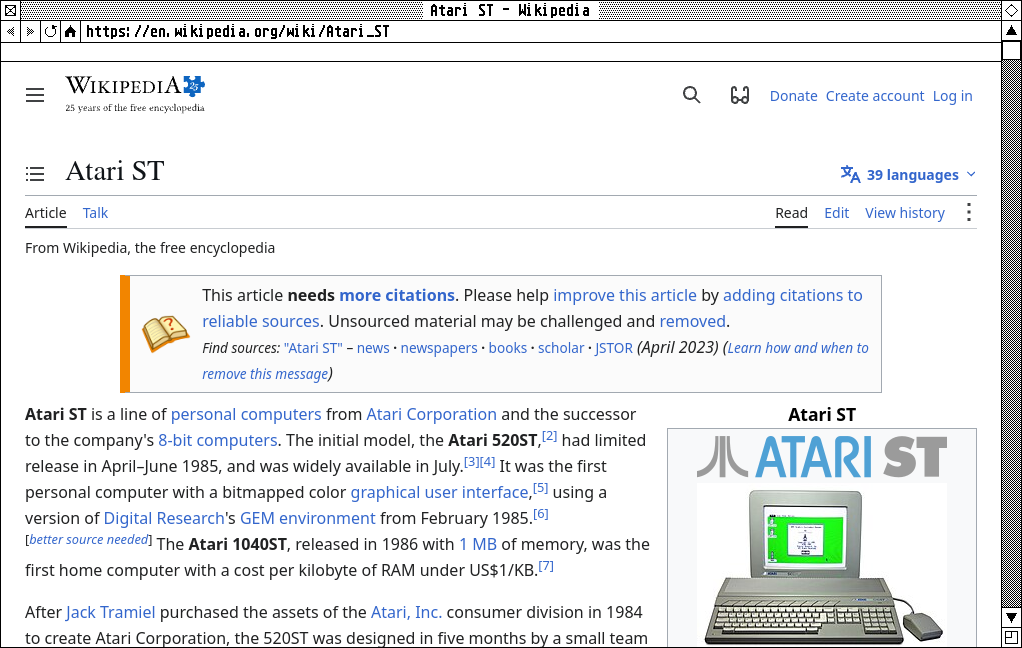
A WebKit browser whose tabs, buttons and info line are drawn like GemWM’s windows, and whose pages scroll with the window frame’s own GEM scroll bars. Its menus, File, View and Go, are in the menu bar.
gemweb               # opens a new window
gemweb URL...        # opens tabs in the last-used window
gemweb --app URL [--name NAME]   # a web app in a window of its own
The tab bar appears once a window has two tabs. To make GemWeb the default
browser, for links opened from other programs:
xdg-settings set default-web-browser gemweb.desktop.
Keys
| Keys | Does |
|---|---|
| Ctrl+T / Ctrl+W | new tab / close tab |
| Ctrl+L, F6 | edit the address |
| Ctrl+Tab, Ctrl+Shift+Tab | next / previous tab |
| Alt+Left / Alt+Right | back / forward |
| Ctrl+R, F5 | reload |
| Ctrl+Shift+R, Shift+F5 | reload from the site |
| Ctrl+plus / minus / 0 | zoom in / out / reset |
| Ctrl+P | |
| Ctrl+F | find in the page |
| Ctrl+G, F3 (with Shift) | next (previous) match |
| Ctrl+Alt+R | Reader View |
Middle-click or Ctrl+click opens a link in a background tab; middle-click a
tab to close it. Text that isn’t an address is searched. Right-clicking opens
a GEM menu for what’s under the pointer: a link, an image, a text field,
selected text, or the page. A page’s own alert(), confirm() and
“Leave this page?” come up as GEM alert boxes, naming the site that asks.
Reader View
View > Reader View (Ctrl+Alt+R) shows just a page’s article: the text and its pictures, in a white box on the desk, headed in GemWM’s font, without the site’s scripts and styles. It uses Mozilla’s Readability.js, the library behind Firefox’s Reader View. Printing in Reader View prints just the article.
Ad blocking
GemWeb blocks ads and trackers with EasyList and EasyPrivacy, the lists most ad blockers use, converted to WebKit’s own content-blocking rules, which WebKit compiles and applies itself, so pages load no slower. The lists are fetched again every four days, in the background.
View > Block Ads turns it on or off everywhere, and View > Block Ads on site turns it the other way for the site you’re on.
Web apps
gemweb --app URL opens a site as an app of its own: a window with just the
page, no tabs or address field, named in the menu bar after --name (or the
site). It shares the browser’s logins. Links to other sites open in the
browser; the app’s own pages, redirects and sign-in pop-ups stay in its
window. To put one in the Desk menu:
[Desk > Internet]
Twitter = gemweb --app https://x.com --name Twitter
Passwords
GemWeb fills in logins from a password manager’s command-line tool. For
Bitwarden, with bw installed and logged in, and jq:
[Passwords]
command = gemweb-bw
unlock = gemweb-bw --unlock
A key gadget appears at the right of the toolbar on pages with a login field; press it (or Go > Fill Password) and GemWeb fills the username and password. The first time, it asks for your master password; the session stays unlocked, in memory only, until GemWeb quits or Go > Lock Passwords. Nothing is filled until you ask, only into the page the logins were looked up for, never into an embedded frame, and never into a plain http page.
Other password managers need a small script: GemWeb runs command HOST and
reads one login per line (name, username and password, tab-separated). See
browser/gemweb-bw in the repository.
Zoom
Pages open at the default zoom, View > Default Zoom (100% unless you pick another; on a high-density screen, where GemWM doubles everything to keep its pixels crisp, 80 or 90% is closer to other desktops). Zoom a site in or out and it’s remembered: its pages open that way from then on, and Ctrl+0 puts it back to the default.
Settings
In ~/.config/gemweb/settings (changes apply to the next page loaded):
[General]
home = https://example.com/
search = kagi
home is an address, or start for GemWeb’s own start page. search is
duckduckgo (the default), google, bing, brave, startpage or kagi,
or any search URL with %s where the query goes.
What it needs
webkitgtk-6.0. Video and sound need GStreamer’s plugins too, which
distributions often leave optional (gst-plugins-base, gst-plugins-good,
gst-libav, and gst-plugin-va for hardware decoding); when any are missing,
GemWeb names them on its new-tab page.